

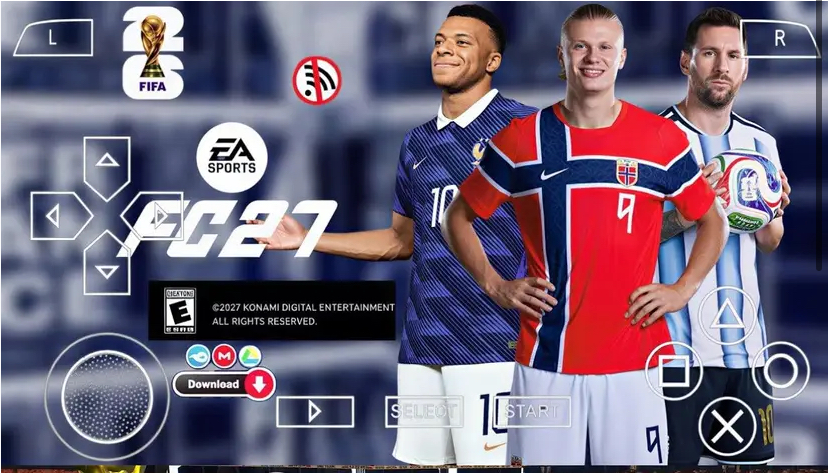
The football gaming landscape in 2026 is dominated by massive 50GB console installations and always-online mobile gacha systems. But tucked away in a corner of the gaming community, a dedicated group of modders has been keeping the PSP era alive — and the eFootball PES 27 PPSSPP Mod with the Betway Premiership Summer Update is arguably the most ambitious revision yet. This is not an official Konami release. It is a community-driven overhaul built on the bones of Pro Evolution Soccer titles originally released for the PlayStation Portable, rebuilt with modern squads, kits, and league structures, then packaged for play through the PPSSPP emulator.
If you are coming to this expecting a native Android football game with online divisions and microtransactions, you will be disappointed. But if you want a fully offline, controller-friendly, surprisingly deep football simulation that runs on hardware most people left behind five years ago, this mod deserves your attention. In this review, I am breaking down exactly what the Summer Update changes, how it plays, how to optimize it, and whether it holds up against modern alternatives.
What Is the Betway Premiership Summer Update?
The “Betway Premiership” branding refers to the South African top-flight league, officially sponsored by Betway. In the context of this PPSSPP mod, the Summer Update represents the modding community’s seasonal refresh cycle — typically released around the July–August transfer window — that injects the latest footballing reality into a now-ancient PSP engine.
What separates this update from previous iterations is the scope of the refresh. The Summer Update does not simply swap player faces or update a few jersey textures. It is a systemic overhaul that touches almost every layer of the game database.
Updated Summer 2026 Transfers
The mod reflects the major moves of the 2026 summer window. Players who switched clubs in June and July have been reassigned to their new squads with updated roster positions. This means if a high-profile striker moved from the Premier League to La Liga in real life, that transfer is represented in the mod’s Master League database and exhibition mode rosters. The accuracy is community-sourced, so while it is not licensed in the traditional sense, the player-club associations mirror reality far closer than the base PSP game ever did.
Betway Premiership Integration
The South African league receives specific attention in this build. Teams like Mamelodi Sundowns, Orlando Pirates, and Kaizer Chiefs are not just placeholder names anymore. The Summer Update includes refreshed kits with 2026/27 season designs, updated squad lists reflecting recent signings in the ABSA Premiership structure, and in some cases, custom chants or ad-board textures referencing Betway sponsorship. For players in South Africa or fans of the league, this level of detail is rare in any football game, let alone a PSP mod.
Kit & Badge Overhauls
Every major European league — the Premier League, La Liga, Serie A, Bundesliga, and Ligue 1 — has received kit updates for the 2026/27 season. This includes home, away, and third kits where applicable. The badge textures have also been cleaned up, replacing the blurry 128×128 pixel art of the original PSP release with sharper, redrawn emblems that hold up when scaled through PPSSPP’s resolution multiplier.
Database Ratings Refresh
Player Overall ratings have been adjusted based on 2025/26 season performance. Breakout young players have seen their stats bumped into the high 70s and low 80s. Aging legends who retired or moved to lower leagues have been downgraded or removed entirely. The result is a database that feels contemporary. When you boot up an exhibition match between Manchester City and Real Madrid, the lineups look roughly like what you would expect to see on a Saturday afternoon in 2026.
Graphics & Presentation on PPSSPP
Let us be honest about the visual ceiling here. The base game is a PlayStation Portable title from the early 2010s. No amount of texture replacement can make it look like eFootball 2027 on PlayStation 5. However, what the PPSSPP emulator does with this mod is genuinely impressive.
Resolution Scaling
On PPSSPP, you can render the game at up to 5× native PSP resolution (480×272). At 3× or 4× on a modern 1080p phone, the player models gain a crispness that was impossible on original hardware. The mod’s custom faces — particularly for high-profile players like Erling Haaland, Kylian Mbappé, and Jude Bellingham — are noticeably cleaner than the stock PSP assets. Stadium textures, pitch grass patterns, and crowd sprites all benefit from the upscale.
Texture Filtering
I recommend setting Texture Filtering to “Auto (1:1)” or “Linear” in PPSSPP settings. The mod uses a mix of original and custom textures, and aggressive filtering can make some of the hand-drawn kit textures look smeared. Linear filtering strikes a balance that keeps the UI sharp while softening the jagged edges on player limbs during replays.
Frame Rate & Stability
The original PES PSP titles targeted 30 frames per second, and this mod maintains that lock. On even a mid-range Android device from 2024 or newer, the game holds a solid 30fps with no frameskip required. On something like a Samsung Galaxy A34 or Xiaomi Redmi Note 13, you can enable “Auto Frameskip” set to 1 or 2 if you notice stutter during rainy weather matches, though I found this unnecessary on most hardware.
The Summer Update introduces some heavier stadium textures in certain European grounds. If you experience slowdown during night matches with full crowd rendering, drop the “Rendering Resolution” from 4× to 2× and disable “Texture Scaling” in the emulator. The visual difference is minor on a 6-inch screen, but the performance gain is significant.
Gameplay Mechanics & Controls
This is where the mod transcends its age. The PES engine on PSP was always more simulation-oriented than its FIFA counterpart on the same hardware. The Summer Update preserves that DNA. Passing is weighted. Shooting requires timing. Defending demands manual intervention. If you are used to mobile football games where the AI intercepts automatically and shots home from 30 yards with a single button press, this will feel like a cold shower.
Basic Movement & Passing
- Analog Stick / D-Pad: Player movement. The analog nub on the PSP was notoriously imprecise, but mapped to a modern touchscreen analog stick or a Bluetooth controller, movement is smooth. I strongly recommend using a physical controller if possible.
- Cross Button (X): Short pass, ground pass. Hold to charge power. Tap for a quick one-touch pass.
- Circle Button (O): Long pass / through ball. Double-tap for a driven through ball along the ground.
- Square Button (□): Shoot. Tap for a finesse shot. Hold to charge power; release to strike. The power meter appears at the bottom of the screen.
- Triangle Button (△): Lob pass / chipped through ball. Essential for breaking a high defensive line.
Advanced Techniques
- R Button (Right Shoulder): Sprint. Do not hold it constantly. Player stamina drains rapidly, and sprinting into a tackle reduces ball control. Use it in bursts.
- L Button (Left Shoulder): Player switch (defense) / Trigger run (offense). When you have possession, tapping L sends the nearest AI teammate on a forward run. This is critical for breaking down compact defenses.
- L + Square: Power shot. Hold L, then charge Square. Use this inside the penalty area when the keeper is off his line.
- L + Circle: Driven cross. Low, fast cross into the box. Far more effective than a floated cross against tall center-backs.
- R + Triangle: Chip shot. Hold R and tap Triangle when the goalkeeper rushes out. Timing is everything; too early and the keeper recovers, too late and he smothers it.
Skill Moves
The PSP PES engine uses contextual skill moves rather than complex stick rotations. To execute a step-over or roulette, hold R and flick the Analog Stick left then right (or right then left) while facing a defender. The player will automatically select the appropriate move based on their Dribbling stat. High-rated dribblers like Vinícius Júnior or Bukayo Saka will execute rapid step-overs. Slower players may manage only a basic body feint.
Defending
Defense in this mod is manual and punishing.
- Cross Button (X): Pressing tackle. Time this carefully; a mistimed press leaves your defender flat-footed for two seconds.
- Square Button (□): Sliding tackle. High risk, high reward. In wet conditions, slide tackles cover more ground but the recovery animation is longer.
- L Button: Switch to the defender nearest the ball. You must do this manually; the AI will not auto-switch for you in most camera angles.
- R Button: Sprint jockey. Hold R while moving toward an attacker to maintain a tight marking distance without committing to a tackle.
The key to defending in this mod is patience. Rushing a tackle against a skilled dribbler results in a red-carded lunge or a clean breakaway. Instead, use the jockey button to shepherd the attacker toward the sideline, then press X only when the ball is exposed during a dribble animation.
Set Pieces
- Free Kicks: Use the Analog Stick to aim. The arrow shows trajectory. Hold Square to charge power; release to shoot. For a curled free kick, hold the Analog Stick left or right during the run-up. Players with high Curve stats (typically 85+) can bend the ball around a wall.
- Corners: Triangle for an inswinging cross, Circle for an outswinger. Use L to cycle through target players in the box.
- Penalties: The camera shifts behind the taker. Aim with the Analog Stick, then hold Square to charge. A fully charged bar results in a rocket that is easy to save; a 60–70% charge with top-corner aim is optimal.
PPSSPP Emulator Optimization Guide
To get the most out of this mod, your emulator settings matter as much as the mod itself. Here is the configuration I use for consistent 30fps performance with maximum visual fidelity.
Graphics Settings
- Backend: Vulkan if your device supports it. OpenGL is the fallback. Vulkan reduces stutter during cutscenes.
- Rendering Mode: Buffered rendering. Skip buffer effects can break the overlay graphics.
- Rendering Resolution: 3× PSP (960×544) for 1080p phones. 4× for 1440p displays.
- Display Resolution: Native device resolution.
- Frame Skipping: Off. If you experience slowdown, set to Auto (1 frame) rather than constant.
- Texture Filtering: Linear on FMV. Linear on textures.
- Texture Scaling: Off. The mod’s custom textures are already upscaled; additional scaling causes artifacts.
- Anisotropic Filtering: 2× or 4×. Helps pitch textures look sharper at oblique camera angles.
Audio Settings
- Audio Backend: OpenSL ES on Android. Latency should be set to Low. The crowd audio and commentary in the Summer Update are synchronized correctly at low latency.
- Audio Sync: On. Prevents the whistle and kick sounds from drifting during longer matches.
Controls
- Touch Controls: Enable if you have no controller. Set opacity to 40% so they do not obscure the pitch. I recommend the “Modern” layout which places the analog stick in the bottom-left and action buttons in the bottom-right.
- Controller Mapping: If using a Bluetooth controller (Xbox, PS4, or generic), map the PSP buttons 1:1. The shoulder buttons (L/R) are essential for advanced play, so ensure your controller has functional shoulder triggers.
System & Save Data
- Save Data Location: Set to /PSP/SAVEDATA/ in your internal storage. The Summer Update includes a pre-configured option file that must be loaded from this directory.
- Save States: Use sparingly. The mod’s database is large, and save states created on one version of PPSSPP may not load correctly on another. Stick to in-game memory card saves for stability.
Comparison with a Game I Played: eFootball 2027 Mobile
Before I wrap this up, I want to put this mod in context against something most readers will have access to: eFootball 2027 Mobile on Android and iOS. I have spent significant time with both, and the contrast is fascinating.
Graphics & Presentation
eFootball 2027 Mobile is objectively the prettier game. Player face scans are photorealistic. Stadium lighting is dynamic. The grass has individual blade physics in some grounds. The PES 27 PPSSPP Mod cannot compete here. Its player faces are hand-painted textures wrapped around low-polygon heads. Stadiums are simplified bowls with 2D crowd sprites.
But — and this matters — the PPSSPP mod runs at a locked 30fps on a $120 Android phone. eFootball 2027 Mobile chugs to 20fps on the same hardware during online events and demands a constant internet connection. If you are gaming on a budget device or in an area with poor connectivity, the mod is the only viable option.
Gameplay Depth
Here is where the old engine punches above its weight. eFootball 2027 Mobile uses a heavily assisted control scheme. Passing is magnetized to teammates. Defending is largely automated. The game wants you to focus on card collecting and team building rather than mechanical skill.
The PES 27 PPSSPP Mod is the opposite. Passing is entirely manual. There is no assisted cursor snapping. If you aim a pass slightly behind a running winger, the ball goes behind him. If you charge a shot too long, it sails into the stands. The skill ceiling is higher, and the satisfaction of scoring a curled free kick or threading a through ball is greater because you earned it.
Content & Modes
eFootball 2027 Mobile wins on volume. It has online seasons, co-op play, weekly events, and a constant drip of new cards. The PPSSPP mod is strictly offline. Its Master League mode is deep — you manage transfers, youth development, and finances over multiple seasons — but it is a solitary experience. There are no microtransactions, which is refreshing, but also no live service updates. When the next seasonal mod drops, you manually install it.
Licensing
Ironically, the mod often has better real-world league representation than the official mobile game. Konami lost many European league licenses to EA over the years. The modding community ignores corporate licensing agreements and includes real team names, kits, and league structures by default. The Betway Premiership, for example, is fully represented in the mod. In eFootball 2027 Mobile, you will not find that level of South African league detail.
Verdict on the Comparison
If you want a polished, social, graphically impressive football game and you have a flagship phone with unlimited data, play eFootball 2027 Mobile. If you want a mechanically rich, fully offline, low-spec-friendly football simulation that respects your time and does not ask for money every week, the PES 27 PPSSPP Mod is the better choice. They serve different masters.
Is It Worth Playing in 2026?
The eFootball PES 27 PPSSPP Mod — Betway Premiership Summer Update is not for everyone. If you demand 4K HDR visuals, online competitive rankings, and official UEFA license branding, this will feel like a relic. But if you value gameplay purity, offline accessibility, and the ability to play a deep football management simulation on hardware that fits in your pocket without draining your battery or your wallet, this mod is genuinely special.
The Summer Update specifically is the most polished iteration I have seen from the PPSSPP modding community. The transfer database is current. The Betway Premiership integration shows care for leagues often ignored by mainstream developers. The kit textures are sharp. And the underlying PES engine remains one of the most satisfying football simulations ever coded for handheld hardware.
Who should play this?
- Players with low-end or older Android devices
- Football fans in regions with expensive or unreliable internet
- South African football fans who want accurate Betway Premiership representation
- Nostalgia seekers who miss the pre-Frostbite, pre-microtransaction era of football gaming
- Commuters who want a full Master League season without needing a server connection
Who should skip it?
- Graphics-first players who cannot tolerate sub-720p textures
- Online-only competitors who need ranked matchmaking
- Players who want official commentary and broadcast presentation
Frequently Asked Questions
Can I play this mod online against other people? No. The PPSSPP emulator supports local ad-hoc multiplayer over Wi-Fi if two devices are on the same network, but there is no online infrastructure for matchmaking or ranked play. This is an offline experience.
Does this work on iPhone or iPad? Yes, through the iOS version of PPSSPP available via AltStore or sideloading. The installation process is more involved than on Android. Performance is generally excellent on A13 chips and newer.
Will my save data from an older PES PPSSPP mod transfer over? Sometimes. Option files (team data, transfers, kits) are typically tied to the specific mod version. Master League saves may load but can crash if the database structure changed significantly between versions. Always back up your SAVEDATA folder before installing a new update.
Why does the game crash when I try to start a Master League? This usually happens if the option file is not loaded correctly. Ensure the mod’s SAVEDATA folder is placed in the correct PPSSPP directory. If the crash persists, check that your PPSSPP version is 1.15 or newer; older builds have memory allocation bugs with large mod databases.
Is a controller necessary? Not strictly, but highly recommended. Touchscreen controls work for casual exhibition matches, but the precision required for manual defending and weighted passing is difficult to achieve with on-screen buttons. A $15 Bluetooth controller transforms the experience.
Final Thoughts
Download this game on Mzansi Pes .com.ng today!
The eFootball PES 27 PPSSPP Mod — Betway Premiership New Summer Update is a testament to what a dedicated community can accomplish with aging tools. It will not replace your console football game, and it was never meant to. What it offers is something increasingly rare in 2026: a complete, offline, mechanically satisfying football simulation that respects the player and runs on almost anything.
If you have a phone, a PPSSPP emulator, and an hour to spare, load up an exhibition match between Orlando Pirates and Kaizer Chiefs in the updated FNB Stadium and tell me the game does not feel alive. The Summer Update proves that great football gameplay is not about polygon counts or card pack odds. It is about the weight of the pass, the timing of the tackle, and the roar of the crowd when the ball hits the back of the net. This mod delivers all three.
What is your experience with PPSSPP football mods? Have you tried the Summer Update yet? Drop your thoughts in the comments below.
