
If you’re preparing to register for the Unified Tertiary Matriculation Examination (UTME) or Direct Entry (DE) in Nigeria, there’s one crucial piece of information you absolutely cannot do without your JAMB Profile Code. This unique identifier is your gateway to accessing all JAMB services, and without it, you simply cannot proceed with your registration. Whether you’ve misplaced your code or you’re generating one for the first time, I’m here to walk you through every single step you need to take in 2026.
- How to Generate Your JAMB Profile Code for the First Time
- Requirements You Need Before Starting
- How do I create my profile code for JAMB?
- How to get JAMB profile code through SMS
- How to Check or Retrieve Your Lost JAMB Profile Code
- 1 How to check or retrieve your lost jamb profile code using SMS
- 2. Checking Through the JAMB e-Facility Portal
- 3. Visiting a JAMB Accredited CBT Centre
- 4. Searching Your Registered Email Address
- Troubleshooting Common Problems When Retrieving Your Code
- What to Do When You Don’t Receive a Reply
- How to Handle “Number Already Registered” When Generating JAMB Profile Code
- Avoiding Scams and Fraudulent Retrieval Services
- Important Steps After Successfully Retrieving Your Code
- Conclusion
By the time you finish reading this guide, you’ll know exactly what to do, which method works best for your situation, and how to avoid the common mistakes that trip up thousands of candidates every year.
What Exactly is a JAMB Profile Code?
Your JAMB Profile Code is a system-generated 10-character code that serves as your unique identifier within the Joint Admissions and Matriculation Board’s database. When JAMB introduced this system, their primary goal was to create a seamless link between your National Identification Number (NIN) and their registration platform.
Here’s how it works: when you generate your profile code for the first time, the JAMB system connects directly to the National Identity Management Commission (NIMC) database using your NIN. It pulls your biodata your full name, date of birth, and other personal details straight from the source.
This means you can’t falsify information or create multiple identities, which was a major problem in previous years. The code is permanently tied to the phone number you use during generation, creating a secure link that only you should have access to.
I cannot stress this enough that once your profile code is generated, it cannot be changed or transferred to another phone number. This is why you must use your personal GSM number, one that you have constant access to during the generation process. Ma Many candidates have made the mistake of using a friend’s number or a temporary SIM card, only to find themselves in serious trouble when they need to retrieve their code later. Learn from their mistakes and
Why Your JAMB Profile Code is Critical for Your Registration
Now that you understand what the code is, let me explain why it’s absolutely essential for your 2026 registration process. Without this code, you’re essentially invisible to the JAMB system. You cannot create a profile on the e-facility portal, which is the starting point for everything else. You cannot purchase the registration PIN that allows you to book an examination slot. You cannot log in to check when your results are released or track your admission status when universities start sending out their offers.
I’ve seen candidates panic just days before registration closes because they couldn’t access their profile code. Some had written it down on a piece of paper that got lost. Others thought they would remember it, only to discover that ten random characters are harder to recall than they imagined. Still others used someone else’s phone number and can no longer contact that person. All of these situations are avoidable if you take the proper precautions from the very beginning.
The profile code also serves as a security measure protecting your personal information. Since it’s linked to both your NIN and your phone number, unauthorized persons cannot easily access your JAMB account or manipulate your registration details. This is particularly important in an era where examination fraud and identity theft are real concerns. By keeping your code secure and confidential, you’re protecting your academic future from potential sabotage or fraud.
How to Generate Your JAMB Profile Code for the First Time
If you’re a first-time candidate and haven’t generated your profile code yet, this section is specifically for you. I’ll walk you through the entire process step by step, ensuring you get it right the first time. After this, we’ll move on to retrieval methods for those who already have a code but need to recover it.
Requirements You Need Before Starting
Before you begin the generation process, you need to gather a few essential items. First and foremost, you must have your valid 11-digit National Identification Number (NIN). If you don’t have your NIN yet, you’ll need to visit any NIMC enrollment center to get enrolled and receive your NIN slip. You can also download the NIMC mobile app to access your NIN digitally this is actually more convenient because you’ll always have it on your phone.
Next, you need a mobile phone with an active GSM line. This is crucial: the phone number you use must be one that you personally own and have continuous access to. Don’t borrow someone’s phone for this process. Don’t use a SIM card that you’re planning to discard soon. The phone number becomes permanently linked to your profile, and you’ll need it for future retrievals and verifications. Make sure the SIM card is properly registered in your name, as JAMB may introduce additional verification measures that check this.
You’ll also need a minimum of ₦50 airtime on the phone you’re using. The SMS service isn’t free—it costs approximately ₦50 per message, though this amount may vary slightly depending on your network provider.
Having at least ₦100 is safer, just in case you need to resend the message due to network issues. There’s nothing more frustrating than sending the SMS only to discover you don’t have enough airtime, causing the transaction to fail.
Finally, have a pen and paper ready, or better yet, have your phone’s screenshot function ready to use. The moment you receive your profile code, you need to save it immediately. I recommend taking a screenshot, writing it down in at least two different notebooks, and if possible, saving it in a secure note-taking app on your phone. Some candidates even email the code to themselves for extra backup. You can never be too careful with something this important.
How do I create my profile code for JAMB?
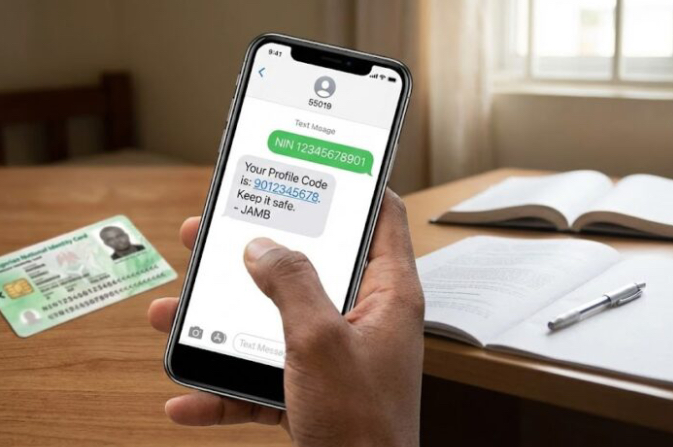
Now let me walk you through the actual generation process using the SMS method, which is the most common and straightforward approach. This method works for all Nigerian mobile networks including MTN, Glo, Airtel, and 9mobile.
Step 1: Open the messaging application on your phone. This is usually the default SMS app that comes with your phone. Make sure you’re using the actual phone number you want to link to your JAMB profile, not a dual SIM where you might accidentally send from the wrong number.
Step 2: Compose a new message. In the message body, type exactly as follows: NIN (space) your 11-digit NIN. For example, if your NIN is 12345678901, you would type: NIN 12345678901.
Pay very close attention to formatting here there should be exactly one space between “NIN” and your number. Don’t add extra spaces, don’t add dashes or hyphens in your NIN, and make sure you type all 11 digits correctly. A single wrong digit will cause the entire process to fail.
Step 3: In the recipient field, type either 55019 or 66019. Both short codes work, though some candidates report better success rates with one or the other depending on their network provider. If one doesn’t work initially, you can try the other.
Step 4: Send the message and wait. You should receive a response within a few minutes, though during peak registration periods, it might take up to 10-15 minutes. The reply SMS will contain your 10-character Profile Code, your full name as registered with NIMC, and a confirmation of your NIN. This is the moment you need to act fast—immediately take a screenshot or write down the code before doing anything else.
Step 5: Verify the information in the reply message. Check that the name displayed matches your actual name. If there’s a discrepancy, it could indicate that your NIN details aren’t properly updated in the NIMC database, and you may need to visit NIMC to make corrections before proceeding with JAMB registration.
I cannot overemphasize the importance of double-checking everything before you hit send.
I’ve counseled students who accidentally sent their message to the wrong number, or who typed their NIN incorrectly and then wondered why they didn’t receive a response. Take your time with this step—there’s no prize for rushing and making mistakes.
How to get JAMB profile code through SMS
For those who prefer using USSD codes instead of SMS, JAMB has provided an alternative method that works just as well. Some people find USSD more convenient because you get instant on-screen responses rather than waiting for an SMS reply.
To use this method, simply dial the following code on your phone: *550191Your11DigitNIN# or alternatively 660191Your11DigitNIN#.
For example, if your NIN is 12345678901, you would dial *550191*12345678901#. Make sure you don’t include any spaces in the USSD code itself, and ensure all the asterisks and hash symbols are in the correct positions.
After dialing, press the call button. Your phone screen will display a series of prompts that guide you through the process. Follow these prompts carefully, and within moments, your profile code will be displayed on your screen.
Again, immediately screenshot this information or write it down securely. The USSD method typically costs the same ₦50 as the SMS method, deducted automatically from your airtime balance.
One advantage of the USSD method is that it tends to be faster during periods of high network congestion. SMS messages sometimes get delayed in queues, especially when thousands of candidates are all trying to generate or retrieve their codes simultaneously during registration season. USSD commands are processed in real-time, giving you immediate feedback.
How to Check or Retrieve Your Lost JAMB Profile Code
Now we move to the section that many of you have been waiting for—how to retrieve your profile code if you’ve lost it, forgotten it, or simply can’t find where you saved it. Don’t panic if you’re in this situation. JAMB has provided multiple official channels for code retrieval, and I’ll explain each one in detail so you can choose the method that works best for your circumstances.
1 How to check or retrieve your lost jamb profile code using SMS
The first and often most effective method is to simply repeat the generation process using the exact same phone number you originally used. This is why I stressed earlier how important it is to use your personal number—if you still have access to that number, retrieval becomes incredibly easy.
From the same phone number, compose a new SMS message typing: NIN (space) your 11-digit NIN, exactly as you did when you first generated the code. Send this message to 55019 or 66019. In many cases, the system will recognize that this NIN already has a profile code associated with it and will resend your existing code rather than trying to generate a new one.
This method works remarkably well for most candidates. I’ve guided hundreds of students through this process, and the majority successfully retrieve their codes within minutes using this simple approach. The cost is still approximately ₦50, which is a small price to pay for the relief of getting your code back without complications.
If you prefer USSD, you can also dial 550191Your11DigitNIN# or 660191Your11DigitNIN# from the registered number. The system will display your existing profile code on your screen. Remember, this only works if you’re using the exact same phone number that was originally linked to your profile. If you’ve changed numbers or lost access to the original SIM card, you’ll need to use one of the other methods I’ll describe next.
One important note: make absolutely certain you’re using the registered phone number. If you try this method from a different number, you’ll either receive an error message saying the number is already registered (which means it’s tied to a different profile), or the system might try to generate a new profile code entirely, which would create complications. When in doubt, try the SMS method first—it’s quick, cheap, and usually works.
2. Checking Through the JAMB e-Facility Portal
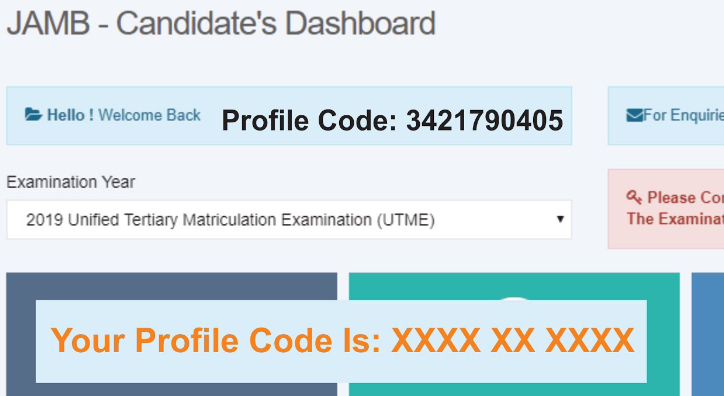
If the SMS method doesn’t work for you, or if you prefer using a computer or smartphone browser, the JAMB e-facility portal offers another reliable option. This method requires that you previously registered an email address and password with JAMB, which most candidates do during their first registration.
Step 1: Open your web browser and navigate to the official JAMB e-facility portal. Make sure you’re on the authentic JAMB website check the URL carefully to avoid phishing sites that might steal your information. The correct address should have “jamb.gov.ng” in it.
Step 2: On the homepage, you’ll see a login section. Enter the email address you used when you first created your JAMB profile. This must be the exact same email address if you’ve forgotten which email you used, check your old emails for any messages from JAMB, as they usually send confirmation emails during registration.
Step 3: Enter your password. If you’ve forgotten your password, don’t worry there’s a “Forgot Password?” link right below the password field. Click on it, and JAMB will send a password reset link to your registered email address. Check your inbox and also your spam folder, as these emails sometimes get filtered incorrectly.
Step 4: Once you successfully log in, you’ll be directed to your candidate dashboard. This is your personal control center for all JAMB-related activities. Look at the top left corner of the dashboard or in the profile section your 10-character Profile Code is typically displayed prominently here. It might be labeled as “Profile Code” or “JAMB Profile Code.”
Step 5: Once you see your code, immediately save it. Take a screenshot of the entire dashboard page, write the code down, and store it securely. While you’re logged in, it’s also a good idea to review and update any other information in your profile, such as your phone number and email address, to ensure everything is current for the 2026 registration.
This method is particularly useful if you no longer have access to the phone number you originally used for generation. As long as you can remember your email and password, you can retrieve your code without needing the original SIM card. However, if you’ve forgotten both your password and lost access to your registered email, you’ll need to move on to the next method.
3. Visiting a JAMB Accredited CBT Centre
Sometimes, despite your best efforts, the online and SMS methods just don’t work. Perhaps you’ve changed your email, lost your phone, or encountered technical issues with the portal. When all else fails, the most reliable solution is to visit a physical JAMB office or accredited CBT registration center. This is also the best option if you’re not particularly tech-savvy or if you prefer face-to-face assistance.
Step 1: Locate the nearest JAMB accredited CBT center or JAMB state office in your area. You can find a list of accredited centers on the official JAMB website. Make sure you’re visiting an officially accredited center there are many unauthorized centers that claim to offer JAMB services but are not recognized by the board.
Step 2: Gather the necessary documents before your visit. You should bring your NIN slip or have your NIN details memorized, the phone number that was linked to your profile (even if you no longer have access to the actual SIM card, the number itself is important), and if possible, any previous JAMB registration slips or numbers from past examinations. These documents help the center staff verify your identity and locate your profile in the system.
Step 3: Visit the center during their working hours, which are typically weekdays from morning to afternoon. Be prepared to possibly wait in a queue, especially during peak registration periods when centers are handling high volumes of candidates.
Step 4: Explain your situation to the staff at the center. Tell them you need to retrieve your lost profile code and provide all the relevant information you’ve brought. The staff have direct access to the JAMB database and can look up your profile using your NIN or other identifying information.
Step 5: The staff will verify your identity, locate your profile, and provide you with your profile code. This service is usually free or costs a minimal fee. Once you have your code, write it down immediately and thank the staff for their assistance.
This method is virtually foolproof because you’re dealing directly with JAMB-authorized personnel who have the tools and access to retrieve your information regardless of technical issues. The only downside is that it requires physical travel and may take more time than the online methods, but if you’re stuck, it’s absolutely worth the effort. I’ve never seen this method fail for a legitimate candidate with proper identification.
4. Searching Your Registered Email Address
This is often the simplest method, yet surprisingly, many candidates forget to check their email. When you first generated your profile code or registered for JAMB services, the system likely sent you a confirmation email containing important details, including your profile code.
Open your email account specifically the one you used for JAMB registration and use the search function to look for emails from JAMB. Search for keywords like “JAMB,” “Profile Code,” “registration,” or “confirmation.” Check not only your inbox but also your spam or junk folder, as important emails sometimes get incorrectly filtered.
If you find the original confirmation email, your profile code should be listed there along with other registration details. This method takes just a few minutes and costs nothing, so it’s always worth trying before moving on to more complex solutions. I’ve had students who spent hours trying other methods only to discover the code was sitting in their email all along.
The key here is to be thorough in your search. Sometimes the code isn’t in the subject line but buried in the email body, so you need to actually open and read the emails rather than just scanning subject lines. If you maintain good email organization with folders and labels, this becomes even easier.
Troubleshooting Common Problems When Retrieving Your Code
Even when following all the steps correctly, you might encounter some challenges. Let me address the most common problems candidates face and provide practical solutions for each one.
What to Do When You Don’t Receive a Reply
If you’ve sent the SMS to 55019 or 66019 but haven’t received a response after 10-15 minutes, don’t immediately panic. First, check your airtime balance to ensure the ₦50 was actually deducted. If it wasn’t deducted, the message likely didn’t go through at all, and you need to resend it.
Next, verify that you formatted the message correctly. Go back and check: Did you type “NIN” in capital letters? Is there exactly one space between “NIN” and your number? Did you enter all 11 digits of your NIN without any dashes or extra characters? Even a tiny formatting error can cause the system to reject your request.
If everything looks correct but you still haven’t received a response, try using the alternative shortcode. If you originally sent to 55019, try 66019 instead, or vice versa. Different networks sometimes route more efficiently through different codes. You should also try during off-peak hours early morning or late evening when network congestion is lower.
Wait at least 5-10 minutes between attempts. Sending multiple messages in rapid succession won’t speed things up and might actually trigger spam filters that block your requests.
Patience is key here. If after trying both shortcodes and waiting a reasonable time you still get no response, move on to the e-facility portal method or plan to visit a CBT center.
How to Handle “Number Already Registered” When Generating JAMB Profile Code
If you receive a message saying “Number Already Registered” or something similar, it means the phone number you’re texting from is already linked to a JAMB profile but it might not be yours. This happens in two common scenarios.
First, you might be using a different phone number than the one you originally used for a generation. Remember, the profile code is permanently tied to the original number. If you’ve changed SIM cards or phone numbers since you first generated your code, you can’t retrieve it using the new number.
You need to either find the original SIM card or use one of the other retrieval methods like the e-facility portal or visiting a center.
Second, if you’re using a recycled phone number (a number that was previously assigned to someone else and reassigned to you by your network provider), that number might still be linked to the previous owner’s JAMB profile.
This is a more complicated situation. You’ll need to contact your network provider to confirm whether the number is truly yours, and then visit a JAMB office with proof of ownership to resolve the conflict.
The solution in most cases is simple: use the original phone number you registered with, or if that’s not possible, use a different retrieval method entirely. Don’t try to force the system to accept a different number—it won’t work and will only frustrate you.
Avoiding Scams and Fraudulent Retrieval Services
Unfortunately, during every JAMB registration season, scammers emerge claiming they can retrieve your profile code for a fee. They set up fake websites that look similar to the official JAMB portal, or they hang around CBT centers offering to help for inflated prices. You must be vigilant and avoid falling victim to these fraudsters.
Here are the facts, retrieving your profile code through official channels costs either nothing (if using the portal or email) or approximately ₦50 (if using SMS). No legitimate service should charge you thousands of naira for this simple process. If someone is asking you to pay ₦1,000, ₦2,000, or more for profile code retrieval, they’re trying to scam you.
Only use the official JAMB website at jamb.gov.ng or efacility.jamb.gov.ng. Check the URL carefully before entering any personal information. When in doubt, type the URL directly into your browser rather than clicking on links in emails or social media posts.
When visiting a CBT center, go only to accredited centers listed on the official JAMB website. Ask to see their accreditation certificate if you’re unsure. Legitimate centers won’t mind showing proof of their authorization. If someone outside the center offers to help you retrieve your code for a fee before you even go inside, it’s likely a scam, walk away and go directly to the official staff inside the center.
Remember, JAMB has provided free and low-cost official methods for a reason. You don’t need to pay anyone extra money for something you can do yourself with a little patience and guidance. Share this information with your friends and fellow candidates so they don’t fall victim to these scams either.
Important Steps After Successfully Retrieving Your Code
Congratulations! Once you’ve successfully retrieved your profile code, your work isn’t quite done yet. There are several important steps you need to take immediately to ensure you’re fully prepared for the 2026 UTME registration and to prevent losing access again in the future.
First and foremost, save your code in multiple secure locations. Take a screenshot and store it in your phone’s gallery.
Write it down in at least two different notebooks maybe one you keep at home and one in your school bag. Save it in a secure notes app on your phone, preferably one that’s password-protected or syncs to the cloud. Email it to yourself so it’s stored in your email account. Send it to a trusted family member via WhatsApp or SMS so there’s another backup. The more backups you create, the safer you are.
Next, log into the JAMB e-facility portal at https://efacility.jamb.gov.ng/ using your profile code, email, and password. Once inside, carefully review all your personal information.
Check that your name matches exactly what’s on your NIN slip and other official documents. Verify that your date of birth, gender, state of origin, and local government area are all correct. If you spot any errors, you’ll need to use the correction of data service before registration opens.
Update your contact information if necessary. Make sure the email address on file is one you actively use and check regularly. Update your phone number to reflect your current, active number. JAMB sometimes sends important notifications via email or SMS, and you don’t want to miss these messages because your contact details are outdated.
Create a registration preparation checklist. Now that you have your profile code, make a list of the other items you’ll need for registration: your O’Level results, passport photograph (in the correct digital format), choice of institutions and courses, and of course, money to purchase your registration PIN. Gathering these items in advance prevents last-minute stress.
Most importantly, mark your calendar with important JAMB dates for 2026. Watch the official JAMB website and social media channels for announcements about when registration opens, when it closes, examination dates, and result release dates. Set reminders on your phone so you don’t miss critical deadlines.
Share this knowledge with others. If you found this guide helpful, please share it with your friends, classmates, or younger siblings who might also be preparing for JAMB. Helping others navigate this process not only makes their journey easier but also strengthens your own community of aspiring university students.
Leave a comment below sharing your experience. Did these methods work for you? Did you encounter any challenges I didn’t mention? Your feedback helps other readers and helps me improve future guides.
Conclusion
Retrieving or checking your JAMB Profile Code in 2026 doesn’t have to be a stressful experience. As I’ve shown you throughout this comprehensive guide, JAMB has provided multiple official, legitimate channels for accessing your code, whether you’re generating it for the first time or recovering it after misplacing it. The key is understanding which method suits your specific situation and following the steps carefully without rushing.
Remember that your profile code is more than just a random set of characters, it’s your official identity within the JAMB system and your gateway to accessing educational opportunities that could transform your life. Treat it with the same care you’d give to important documents like your birth certificate or bank account information. The few minutes you spend properly saving and securing your code today can save you hours of frustration and potential complications tomorrow.
Throughout this guide, I’ve walked you through four primary methods for code retrieval: the quick SMS method perfect for when you still have access to your registered phone number, the e-facility portal method ideal for those who prefer using computers or have lost their original SIM card, the CBT center visit option that provides face-to-face assistance and virtually guaranteed success, and the often-overlooked email search that might be your fastest solution of all. Each method has its advantages, and you can try them in sequence until you find success.
I wish you tremendous success in your upcoming examination and in all your future academic endeavors. The fact that you’re taking the time to properly understand and prepare for this process shows the kind of seriousness and dedication that leads to success.
Keep that energy going throughout your registration, your exam preparation, and beyond.
Your dream university admission is within reach, and having your profile code is the first crucial step toward making that dream a reality. Good luck, and please share this guide with anyone else who might benefit from it!